Which cable makes CarPlay or Android Auto work in your car?
Free check first. You pay $2 only if we have an answer for your exact car and phone.
Tell us your car and phone. We show the cable to buy, the socket to use, and the steps for Apple CarPlay with a cable.
Start: sign in with an email code
No password. Then choose Check my phone, car and cable and answer about five quick questions.
Example answer
2024 Lexus LC with an iPhone 15
Use a USB-A to USB-C data cable for wired Apple CarPlay.
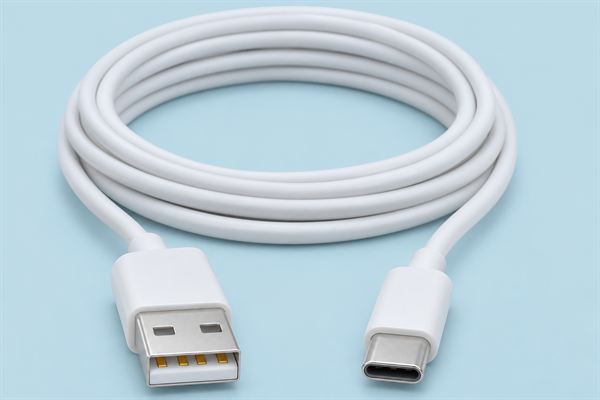
Car end: USB-A
wide rectanglePhone end: USB-C
small oval
Must be a data cable. Charge-only cables look the same.
Cable to buy: Belkin BoostCharge USB-A to USB-C Cable (1 m). USB-IF certified and carries data as well as power.
Get it: Amazon · Walmart · Best Buy
Order online. Store pickup is available at Walmart and Best Buy where the cable is in stock.
Which socket: Use the rectangular USB-A port. It is inside the console box under the centre armrest (slide the armrest back, then lift it). It is the rectangular socket marked with the USB symbol. The small oval socket next to it, marked with a battery symbol, only charges. It will not run CarPlay.
Show the steps
- On your iPhone, turn on Siri. Allow CarPlay. Keep the iPhone software up to date.
- Park the car in a safe place.
- Turn on the car and its screen.
- Unlock your iPhone.
- Connect the cable to that USB-A port and to your iPhone 15.
- If the iPhone asks, allow CarPlay.
- If the car’s screen asks about Apple CarPlay, select Yes or Enable.
- CarPlay opens on the car’s screen.
- If CarPlay does not open, go to the car’s home screen or menu. Then select Apple CarPlay.
If CarPlay does not start: Make sure that you used the port in these instructions, not a charging port. On the iPhone, open Settings, then Screen Time, then Content & Privacy Restrictions, then Allowed Apps. Make sure that CarPlay is on. Park the car. Then restart the phone and the car. If you have a different data cable, try it. A phone that charges does not prove a data connection.
Your answer is for your exact car and phone. It also names a cable to buy and where to get it today.
Cars we cover today (201 models)
U.S. models, original screen and radio. iPhone 13 and newer, or an Android phone with USB-C (Android 11 or later). Some cars are covered for one kind of phone only; the free check tells you.
- Acura ADX 2025
- Acura MDX 2022, 2023, 2024
- Acura RDX 2019, 2020, 2021, 2022, 2023, 2024, 2025
- Acura TLX 2019, 2020
- Alfa Romeo Giulia 2019, 2020, 2021, 2022, 2023, 2024
- Alfa Romeo Stelvio 2019, 2020, 2021, 2022, 2023, 2024, 2025
- Alfa Romeo Tonale 2025
- Alfa Romeo Tonale eAWD 2024, 2025
- Buick Enclave 2018, 2019, 2020, 2021, 2022, 2023, 2024, 2025, 2026
- Buick Encore 2017, 2018, 2019, 2020, 2021, 2022
- Buick Encore GX 2020, 2021, 2022, 2023, 2024, 2025, 2026
- Buick Envision 2020, 2021, 2022, 2023, 2024, 2025, 2026
- Buick Envista 2024, 2025
- Buick LaCrosse 2017, 2018, 2019
- Buick Regal 2017, 2018, 2019, 2020
- Cadillac ATS 2017, 2019
- Cadillac CT4 2021, 2022, 2023, 2024, 2025, 2026
- Cadillac CT5 2021, 2022, 2023, 2024
- Cadillac CT6 2017, 2018, 2019, 2020
- Cadillac CTS 2017, 2019
- Cadillac Escalade 2017, 2018, 2019, 2020, 2021, 2022, 2023, 2024, 2025
- Cadillac XT4 2019, 2020, 2021, 2022, 2023
- Cadillac XT5 2017, 2018, 2019, 2020, 2021, 2022, 2023, 2024, 2025, 2026
- Cadillac XT6 2020, 2021, 2022, 2023, 2024, 2025
- Cadillac XTS 2017, 2019
- Chevrolet Blazer 2019, 2020, 2021, 2022, 2023, 2024, 2025, 2026
- Chevrolet Camaro 2017, 2018, 2019, 2020, 2021, 2022, 2023, 2024
- Chevrolet Colorado 2017, 2018, 2019, 2020, 2021, 2022, 2023, 2024, 2025, 2026
- Chevrolet Corvette 2018, 2019, 2020, 2021, 2022, 2023
- Chevrolet Cruze 2017, 2018, 2019
- Chevrolet Equinox 2018, 2019, 2021, 2022, 2023, 2024, 2025, 2026
- Chevrolet Impala 2017, 2018, 2019, 2020
- Chevrolet Malibu 2017, 2018, 2019, 2020, 2021, 2022, 2023, 2024, 2025
- Chevrolet Silverado 2017, 2018, 2019, 2020, 2021, 2022, 2023, 2024, 2025, 2026
- Chevrolet Sonic 2017, 2018, 2019, 2020
- Chevrolet Spark 2017, 2018, 2019, 2020, 2021, 2022
- Chevrolet Suburban 2017, 2019, 2020, 2021, 2022, 2023, 2024, 2025, 2026
- Chevrolet Tahoe 2017, 2019, 2020, 2021, 2022, 2023, 2024, 2025, 2026
- Chevrolet Trailblazer 2021, 2022, 2023, 2024, 2025, 2026
- Chevrolet Traverse 2018, 2019, 2020, 2021, 2022, 2023, 2024, 2025, 2026
- Chevrolet Trax 2018, 2019, 2020, 2021, 2022, 2024, 2025, 2026
- Chrysler 300 2020, 2021, 2022, 2023
- Chrysler Pacifica 2018, 2019, 2020, 2021, 2022, 2023, 2024
- Chrysler Voyager 2020, 2021, 2022, 2023, 2024
- Dodge Challenger 2018, 2019, 2020, 2021, 2022, 2023
- Dodge Charger 2018, 2019, 2020, 2021, 2022, 2023, 2026
- Dodge Durango 2020, 2021, 2022, 2023, 2024, 2025, 2026
- Ford Bronco 2021, 2022, 2023, 2024, 2025, 2026
- Ford Bronco Sport 2021, 2022, 2025, 2026
- Ford Edge 2017, 2018, 2019, 2020, 2021
- Ford Escape 2017, 2018, 2019, 2020, 2021, 2022, 2023, 2024, 2025, 2026
- Ford Expedition 2017, 2018, 2019, 2020, 2021, 2022, 2023, 2024
- Ford Explorer 2017, 2018, 2019, 2020, 2021, 2022, 2023, 2024
- Ford F150 2017, 2018, 2019, 2020, 2021, 2022, 2023, 2024, 2025, 2026
- Ford Fusion 2020
- Ford Maverick 2022, 2023, 2024, 2025, 2026
- Ford Mustang 2017, 2018, 2019, 2020, 2021, 2022, 2023, 2024, 2025, 2026
- Ford Ranger 2019, 2020, 2021, 2023
- GMC Acadia 2017, 2018, 2019, 2020, 2021, 2022, 2023, 2024, 2025, 2026
- GMC Canyon 2017, 2018, 2019, 2020, 2021, 2022, 2023, 2024, 2025, 2026
- GMC Sierra 2017, 2018, 2019, 2020, 2021, 2022, 2023, 2024, 2025, 2026
- GMC Terrain 2018, 2019, 2020, 2021, 2022, 2023, 2024, 2025, 2026
- GMC Yukon 2019, 2020, 2021, 2022, 2023, 2024, 2025, 2026
- GMC Yukon XL 2019, 2020, 2021, 2022, 2023, 2024, 2025, 2026
- Genesis G70 2022, 2023, 2024, 2025, 2026
- Genesis G80 2021, 2022, 2023, 2025, 2026
- Genesis G90 2020, 2021
- Genesis GV70 2022, 2023, 2025
- Genesis GV80 2021, 2023, 2024
- Honda Accord 2017, 2019, 2020, 2021, 2022, 2023, 2024, 2026
- Honda CR-V 2017, 2018, 2020, 2021, 2022, 2023, 2026
- Honda Civic 2017, 2018, 2019, 2020, 2021, 2022, 2023, 2024, 2025, 2026
- Honda Clarity 2018, 2019, 2020, 2021
- Honda Fit 2018, 2019, 2020
- Honda HR-V 2019, 2020, 2021, 2022, 2023, 2024, 2025, 2026
- Honda Insight 2019, 2020, 2021, 2022
- Honda Odyssey 2018, 2019, 2020, 2021, 2022, 2023, 2024
- Honda Passport 2019, 2020, 2021, 2022, 2023, 2024, 2025, 2026
- Honda Pilot 2017, 2018, 2019, 2020, 2021, 2022, 2023, 2024, 2025, 2026
- Honda Ridgeline 2017, 2018, 2019, 2020, 2021, 2022, 2023, 2024, 2025, 2026
- Hyundai Accent 2020, 2021, 2022
- Hyundai Elantra 2018, 2019, 2020, 2021, 2022, 2024
- Hyundai Ioniq 2020, 2021
- Hyundai Kona 2018, 2020, 2021, 2022, 2024
- Hyundai Palisade 2020, 2021, 2022, 2023, 2024, 2025, 2026
- Hyundai Santa Cruz 2022, 2023, 2025
- Hyundai Santa Fe 2020, 2021, 2022, 2025
- Hyundai Sonata 2018, 2019, 2020, 2024, 2025, 2026
- Hyundai Tucson 2018, 2019, 2020, 2021, 2022, 2024, 2025
- Hyundai Veloster 2019, 2020, 2021
- Hyundai Venue 2020, 2024
- Infiniti Q50 2020, 2021, 2022, 2023, 2024
- Infiniti Q60 2020, 2021, 2022
- Infiniti QX50 2020, 2021, 2022, 2023, 2024, 2025
- Infiniti QX55 2022, 2023, 2024, 2025
- Infiniti QX60 2022, 2023, 2024, 2025, 2026
- Infiniti QX80 2020, 2021, 2022, 2023, 2024, 2025, 2026
- Jeep Cherokee 2019, 2021, 2026
- Jeep Compass 2018, 2021, 2022, 2023, 2024, 2025, 2026
- Jeep Gladiator 2020, 2021, 2022, 2023, 2024, 2025, 2026
- Jeep Grand Cherokee 2020, 2021, 2022, 2023, 2024, 2025, 2026
- Jeep Grand Cherokee 4xe 2022, 2023, 2024, 2025, 2026
- Jeep Grand Cherokee L 2021, 2022, 2023, 2024, 2025
- Jeep Grand Wagoneer 2022, 2023, 2024, 2025, 2026
- Jeep Renegade 2018, 2019, 2020, 2021, 2022, 2023
- Jeep Wagoneer 2022, 2023, 2024, 2025
- Jeep Wrangler 2018, 2019, 2020, 2021, 2022, 2023, 2024, 2025, 2026
- Jeep Wrangler 4xe 2021, 2022, 2023, 2024
- Kia Cadenza 2017, 2018, 2019, 2020
- Kia Carnival 2022, 2023, 2024, 2026
- Kia Forte 2018, 2019, 2020, 2021, 2022, 2023
- Kia K4 2025, 2026
- Kia K5 2021, 2022, 2023
- Kia Niro 2018, 2019, 2020, 2021, 2022, 2026
- Kia Optima 2017, 2018, 2019, 2020
- Kia Rio 2019, 2020, 2021, 2022
- Kia Sedona 2018, 2019, 2020, 2021
- Kia Seltos 2021, 2022, 2023, 2024, 2025, 2026
- Kia Sorento 2018, 2019, 2020, 2021, 2022, 2023, 2025, 2026
- Kia Soul 2017, 2018, 2019, 2020, 2021, 2022, 2023, 2024, 2025
- Kia Sportage 2018, 2019, 2020, 2021, 2022, 2023, 2024, 2025
- Kia Stinger 2018, 2019, 2020, 2021, 2022, 2023
- Kia Telluride 2020, 2021, 2022, 2023, 2024, 2025
- Lexus ES 2019, 2020, 2021, 2022, 2023, 2024, 2025, 2026
- Lexus GX 2022, 2023, 2024, 2025, 2026
- Lexus IS 2021, 2022, 2023, 2024, 2025, 2026
- Lexus LC 2019, 2020, 2021, 2022, 2023, 2024, 2025, 2026
- Lexus LS 2019, 2020, 2021, 2022, 2023, 2024, 2025, 2026
- Lexus LX 2022, 2023, 2024, 2025, 2026
- Lexus NX 2020, 2021, 2022, 2023, 2024, 2025, 2026
- Lexus RC 2020, 2021, 2022, 2023, 2024, 2025
- Lexus RX 2020, 2021, 2022, 2023, 2024, 2025, 2026
- Lexus TX 2024, 2025, 2026
- Lexus UX 2019, 2020, 2021, 2022, 2023, 2024, 2025, 2026
- Lincoln Aviator 2021, 2022, 2023
- Lincoln Corsair 2020, 2021, 2022
- Lincoln MKC 2017, 2018, 2019
- Lincoln MKX 2017, 2018
- Lincoln MKZ 2017, 2018, 2019, 2020
- Lincoln Navigator 2020, 2021
- Mazda 3 2025, 2026
- Mazda CX-30 2025, 2026
- Mazda CX-50 2025, 2026
- Mazda CX-70 2026
- Mazda CX-90 2025, 2026
- Mazda MX-5 2025
- Nissan Altima 2018, 2020, 2021, 2022, 2023, 2024, 2025, 2026
- Nissan Armada 2021, 2022, 2023, 2024, 2025, 2026
- Nissan Frontier 2022, 2023, 2024, 2025, 2026
- Nissan Kicks 2018, 2019, 2020, 2021, 2022, 2023, 2024, 2025, 2026
- Nissan Maxima 2017, 2018, 2019, 2020, 2021, 2022, 2023
- Nissan Murano 2019, 2020, 2021, 2022, 2023, 2024, 2025, 2026
- Nissan Pathfinder 2022, 2023, 2024, 2025, 2026
- Nissan Rogue 2018, 2020, 2021, 2022, 2023, 2024, 2025, 2026
- Nissan Rogue Sport 2020, 2021, 2022
- Nissan Sentra 2019, 2020, 2021, 2022, 2023, 2024, 2025, 2026
- Nissan Titan 2019, 2020, 2021, 2022, 2023, 2024
- Nissan Versa 2019, 2020, 2021, 2022, 2023, 2024, 2025
- Nissan Z 2023, 2024, 2025, 2026
- Porsche 718 2020, 2021, 2022, 2023, 2024, 2025
- Porsche 911 2019, 2020, 2021, 2022, 2023, 2024, 2025
- Porsche Cayenne 2017, 2018, 2019, 2020, 2021, 2022, 2023, 2024, 2025, 2026
- Porsche Macan 2017, 2018, 2019, 2020, 2021, 2022, 2023, 2024, 2025, 2026
- Porsche Panamera 2019, 2020, 2021, 2022, 2023
- Ram 1500 2018, 2019, 2020, 2021, 2022, 2023, 2024, 2025, 2026
- Subaru Ascent 2020, 2021, 2022, 2023, 2024, 2025
- Subaru BRZ 2022, 2023, 2024, 2025, 2026
- Subaru Crosstrek 2018, 2019, 2020, 2021, 2022, 2023, 2024, 2025, 2026
- Subaru Forester 2019, 2020, 2021, 2022, 2023, 2024, 2025, 2026
- Subaru Impreza 2018, 2019, 2020, 2021, 2022, 2023, 2024, 2025, 2026
- Subaru Legacy 2018, 2019, 2020, 2021, 2022, 2023, 2024, 2025
- Subaru Outback 2018, 2019, 2020, 2021, 2022, 2025, 2026
- Subaru WRX 2019, 2020, 2021, 2022, 2023, 2024, 2025
- Toyota 4Runner 2020, 2021, 2022, 2023, 2024, 2025, 2026
- Toyota Avalon 2019, 2020, 2021, 2022
- Toyota C-HR 2020, 2021, 2022
- Toyota Camry 2021, 2022, 2023, 2024, 2025, 2026
- Toyota Corolla 2020, 2021, 2022, 2023, 2024, 2025, 2026
- Toyota Corolla Cross 2022, 2023, 2024, 2025, 2026
- Toyota Crown 2023, 2024, 2025, 2026
- Toyota Crown Signia 2025, 2026
- Toyota GR 86 2022, 2023, 2024, 2025
- Toyota Grand Highlander 2024, 2025, 2026
- Toyota Highlander 2021, 2022, 2023, 2024, 2025, 2026
- Toyota Land Cruiser 2024, 2025, 2026
- Toyota Prius 2020, 2021, 2022, 2023, 2024, 2025, 2026
- Toyota Prius Prime 2020, 2021, 2022, 2023, 2024
- Toyota RAV4 2019, 2020, 2021, 2022, 2023, 2024, 2025, 2026
- Toyota RAV4 Prime 2021, 2022, 2023, 2024
- Toyota Sequoia 2020, 2021, 2022, 2023, 2024, 2025, 2026
- Toyota Sienna 2019, 2020, 2021, 2022, 2023, 2024, 2025, 2026
- Toyota Tacoma 2020, 2021, 2022, 2023, 2024, 2025, 2026
- Toyota Tundra 2020, 2021, 2022, 2023, 2024, 2025, 2026
- Toyota Venza 2021, 2022, 2023, 2024
- Volvo S60 2019, 2020, 2021, 2022, 2023, 2024
- Volvo S90 2019, 2020, 2021, 2023, 2024
- Volvo V60 2019, 2020, 2021, 2022, 2023, 2024, 2025, 2026
- Volvo V90 2019, 2020, 2021, 2022, 2023, 2024, 2025
- Volvo XC40 2019, 2020, 2021, 2022
- Volvo XC60 2019, 2020, 2021, 2022, 2023, 2024, 2025, 2026
- Volvo XC90 2019, 2020, 2021, 2022, 2023, 2024, 2025, 2026
Not on the list? Email cablematch@gmail.com with your car, year and phone.
Guides
- CarPlay and Android Auto cable for the Ford F-150
- CarPlay and Android Auto cable for the Chevrolet Silverado 1500
- CarPlay and Android Auto cable for the Toyota RAV4
- CarPlay and Android Auto cable for the Honda CR-V
- CarPlay and Android Auto cable for the Toyota Camry
- CarPlay will not start: five things to check before you buy anything
- Data cable or charge-only cable: how to tell
- USB-A, USB-C, Lightning: which plug is which
- Wired or wireless CarPlay: which one does my car have
- Android Auto with a cable: what the phone needs
Two ways to pay
$2 for one answer: for drivers. One car, one phone. You get the cable to buy, the socket to use, and the steps to connect. Need another car or phone later? Buy another answer then.
$10 for 30 answers: for people who solve this for others. Repair shops, car audio installers, dealership service desks, and stores that sell cables. That is about 33 cents an answer. Each answer covers one car and one phone. Use them whenever a customer asks; there is no expiry date.
Shops: sign in with one shared email, such as your front-desk address. The pack belongs to that sign-in. More for shops
Both: the check is free, and you pay only if we have an answer. No subscription and no automatic top-up. The cable is bought separately from a store.
Saved answers · Use with an AI assistant
Use the same email each time. A different sign-in is a different account and does not carry purchases over.